
Sniff Desk
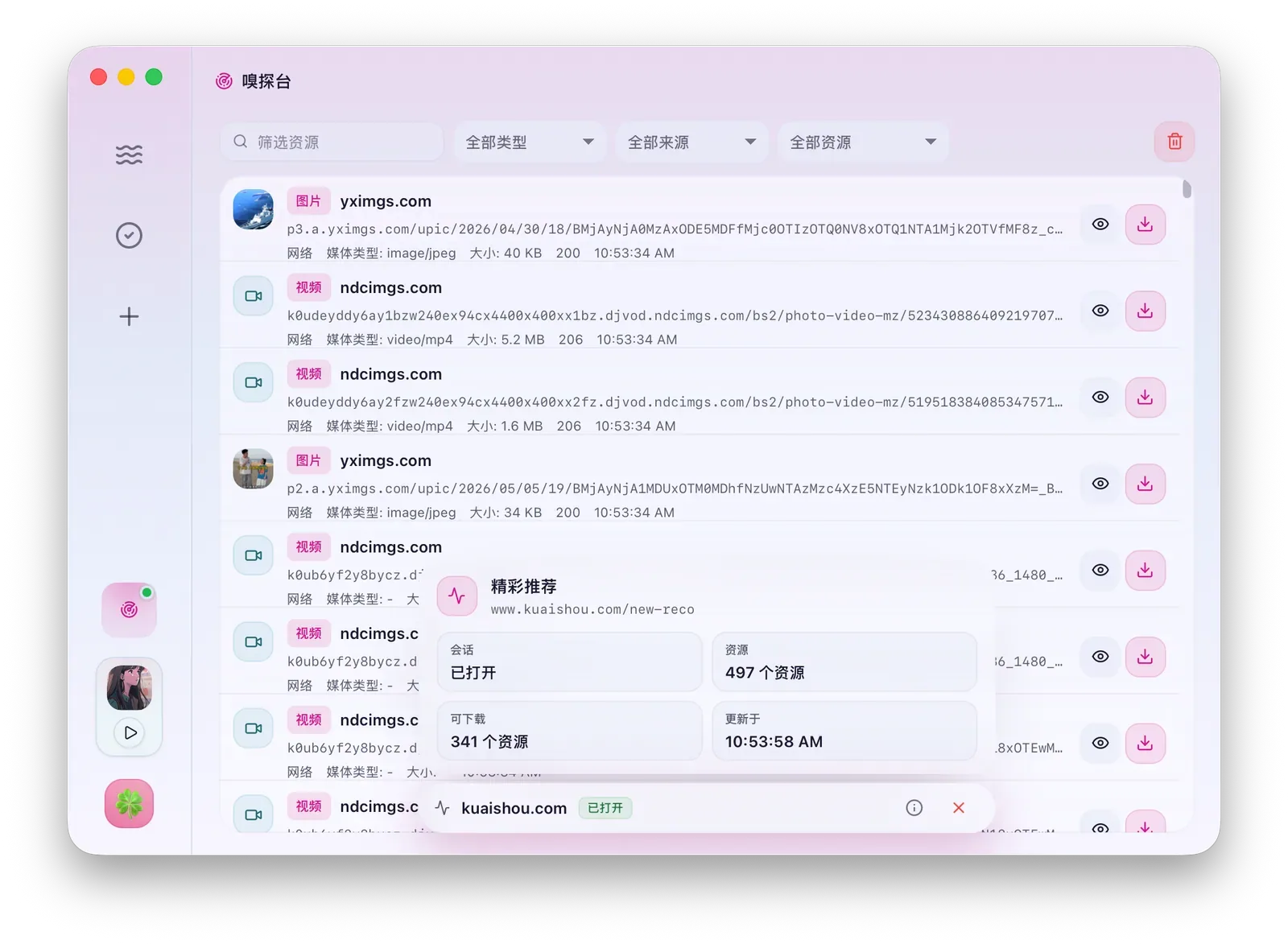
Sniff Desk handles web resources that normal downloads cannot parse directly. It observes a browser page and organizes loaded videos, audio, live streams, manifests, subtitles, images, and API resources.
Suitable Pages
Section titled “Suitable Pages”Use Sniff Desk when Download Task cannot parse a link but the page itself can play or load the media. You do not need to know the real media URL in advance; XiaDown observes network requests while the page runs.
Start Sniffing
Section titled “Start Sniffing”- Open the lower-left avatar menu and choose Sniff Desk.
- Enter a page URL and click Start Sniffing.
- In the opened browser, play the video, scroll, sign in, or finish verification.
- Return to Sniff Desk and inspect captured resources.
- Filter, preview, copy, or download the target resource.
If the browser closes, Sniff Desk shows the session state. You can restart sniffing or close the debugging browser.
Supported Browsers
Section titled “Supported Browsers”| Mainstream browsers | Privacy and productivity browsers | Regional and specialty browsers |
|---|---|---|
| Chrome, Chromium, Edge | Brave, Vivaldi, Arc, Helium | Opera, Opera GX, Yandex Browser |
Open Settings to choose the sniffing browser, refresh the browser list, or clear the isolated sniffing-browser data.
Download and Sniffing Settings
Section titled “Download and Sniffing Settings”| Setting | Effect |
|---|---|
| Sniffing browser | Decides which browser opens when sniffing starts. |
| Download folder | Decides where downloaded resources are saved. |
| Download concurrency | Controls how many tasks run at once after resources become downloads. |
| Fragment concurrency | Controls YT-DLP segment concurrency for HLS and m3u8 resources. |
| Browser data | Lets you view, open, or clear isolated sniffing-browser data. |
Resource Types
Section titled “Resource Types”Sniff Desk may show video, audio, HLS or m3u8 manifests, live streams, subtitles, images, documents, and API resources. Not every captured request is useful; filters help you focus on downloadable media.
Filters and Actions
Section titled “Filters and Actions”| Action | Result |
|---|---|
| Downloadable filter | Shows resources XiaDown believes can be downloaded. |
| Type filter | Narrows the list to video, audio, image, subtitle, or other types. |
| Preview | Opens a quick preview when the resource can be played or displayed. |
| Download | Creates a download task from the selected resource. |
| Copy link | Copies the resource address for reference. |
| Clear | Clears current captured resources and keeps the session ready. |
HLS and Segmented Media
Section titled “HLS and Segmented Media”Many sites split video into HLS or m3u8 segments. When Sniff Desk marks a manifest as downloadable, clicking Download hands it to YT-DLP. Actual segment concurrency is controlled by Fragment concurrency in Settings.
For non-standard HLS or API resources, preview or inspect details first. If a resource is not downloadable, copy the address as a clue, then change playback state or sniff again.
Difference from New Task Sniff
Section titled “Difference from New Task Sniff”New Task Sniff is optimized for 2 site groups: Douyin, and RedNote / Xiaohongshu. Sniff Desk is broader. It is for complex pages and non-optimized sites, with full resource lists, filter reasons, preview, copy, clear, and session-state management.