
Settings
Open Settings from the lower-left avatar menu or from the system tray. Settings is organized by pages, and each page changes future behavior after saving.
General Page
Section titled “General Page”The General page controls language, startup behavior, proxy mode, and basic app preferences. Proxy affects app updates, downloads, sniffing, and online music. If online features fail, check proxy and network settings first.
Appearance Page
Section titled “Appearance Page”Appearance changes the visual style of XiaDown. See Appearance for theme packs, light/dark mode, accent color, fonts, sidebar style, and pets.
Player Page
Section titled “Player Page”The Player page affects Hush, Muse, and Linger. It can enable lyrics options, romanization, pinyin, equalizer behavior, cover effects, and visualization where supported.
Download Page
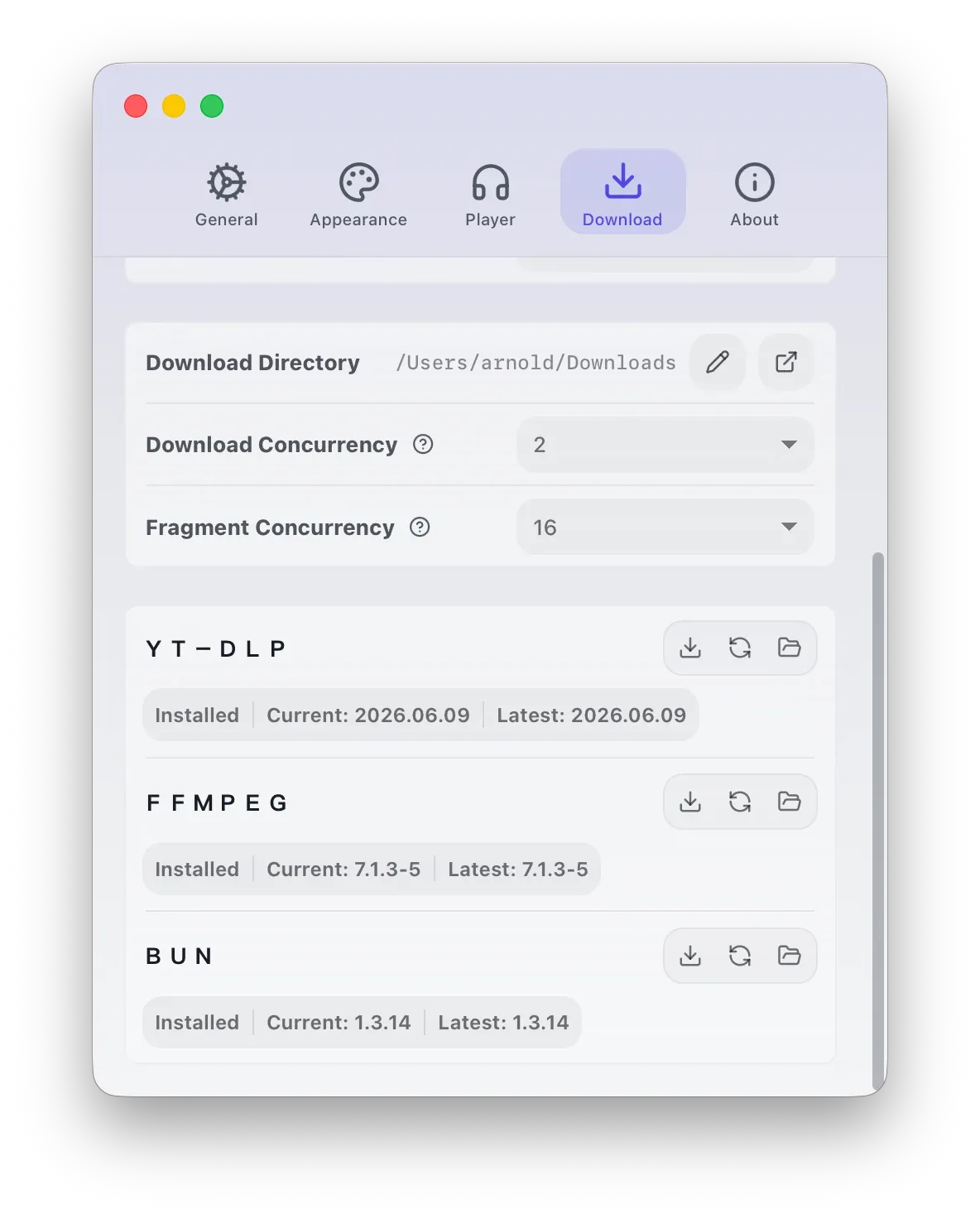
Section titled “Download Page”The Download page configures browser, folders, concurrency, and tools used by Download Task, Sniff Task, and Sniff Desk.
| Setting | Purpose |
|---|---|
| Download folder | Where output files are saved. |
| Sniffing browser | Browser used for sniffing pages and some login flows. |
| Refresh browser list | Rescans installed supported browsers after installation or relocation. |
| Browser data | Shows isolated sniffing-browser data; open the folder or clear it when needed. |
| Download concurrency | Number of download tasks allowed to run at the same time. |
| Fragment concurrency | Number of HLS or m3u8 segments YT-DLP may download at the same time for sniffed stream resources. |
Dependency Tools
Section titled “Dependency Tools”The Download page also shows YT-DLP, FFmpeg, and Bun status, installed version, latest version, and install path.
| Tool | Purpose |
|---|---|
| YT-DLP | Parses and downloads videos, audio, subtitles, covers, playlists, and many supported sites. |
| FFmpeg | Merges streams, handles media segments, and performs post-download or local transcoding. |
| Bun | Provides runtime capability needed by YT-DLP when parsing some sites. |
YT-DLP currently supports Bun only up to 1.3.14. It is normal if XiaDown does not update Bun beyond that range.
About Page
Section titled “About Page”The About page shows the app version, update information, related links, and tool maintenance state. Use it when you want to check whether XiaDown itself or built-in directories have updates.
Common Fixes
Section titled “Common Fixes”| Problem | Try This |
|---|---|
| Download button unavailable | Check that YT-DLP, FFmpeg, and Bun are installed and healthy. |
| Sniffing browser does not open | Refresh the browser list, choose another supported browser, or clear sniffing-browser data. |
| Output files are missing | Open Tasks and Files and repair location. |
| Listen content fails to load | Check network and proxy, and sign in again through App Sessions if needed. |